
This page provides information about Mercury's Orbiter service, responsible for managing, starting, and stopping gameserver instances for the revival platform. An implementation of the Orbiter is available at the tp-link-extender/RCCService repository.
Starting
Section titled “Starting”Upon starting the Orbiter, it will attempt to download the latest version of the Setup package, as distributed on the Setup domain configured in the .env file. If this is successful, or if the latest version is already downloaded, the Orbiter will start accepting connections on 2 ports: a private management port for communication with the Site and only accepting connections from IP addresses configured in the .env file (by default on port 64991), and a public status port for accepting connections from browsers to report the status of gameserver instances (on port 64992 in dev, and on normal HTTP/HTTPS ports of 80 and 443 in production).
The Orbiter's .env file, placed in the same directory as its running executable, should have contents similar to the following:
ENV=devDOMAIN=localhost:5173SETUPDOMAIN=setup.mercs.devIPV4=127.0.0.1IPV6=::1GAMESERVER_KEY=passwordGameservers
Section titled “Gameservers”The process for starting a gameserver with the Orbiter is very similar to that of manually starting a selfhosted gameserver. Gameservers are simply Studio sessions that are started with a Host/Serve loadscript, which starts a network server on a specific port and listens for incoming player connections. The gameserver will load a specific place, and if the server's port is forwarded correctly, players can connect to the server with their Clients and play the game. The Serve loadscript, a similar version of the Host loadscript which runs in dedicated servers, includes a few functions that run periodically for server upkeep, including checking for inactive players to shut down the server once it has been empty for a certain amount of time.
Mercury Core includes configuration options for declaring whether selfhosted or dedicated servers should be used. When using dedicated servers, the Orbiter service is used to manage the gameserver instances, and the Orbiter is given special permissions to carry out required operations, for example getting place files in order to load them. When using selfhosted servers, gameservers are started manually by the server owner, and the Orbiter is not used.
Platforms
Section titled “Platforms”The Orbiter service has been successfully tested on Windows and Linux operating systems. If the host OS is Linux, it will use Wine to run the Studio executable. As such, make sure it is installed, configured correctly to run 32-bit Windows applications, allows access to a virtual desktop if needed, and that it is accessible from the command line as wine.
By default, the Orbiter will start a display server with Wayland (using Weston in headless mode) on Linux, and specify a suitable DISPLAY environment variable (:0) for the Studio session to use. This can be replaced with Xvfb or a physical/non-headless display if issues are encountered.
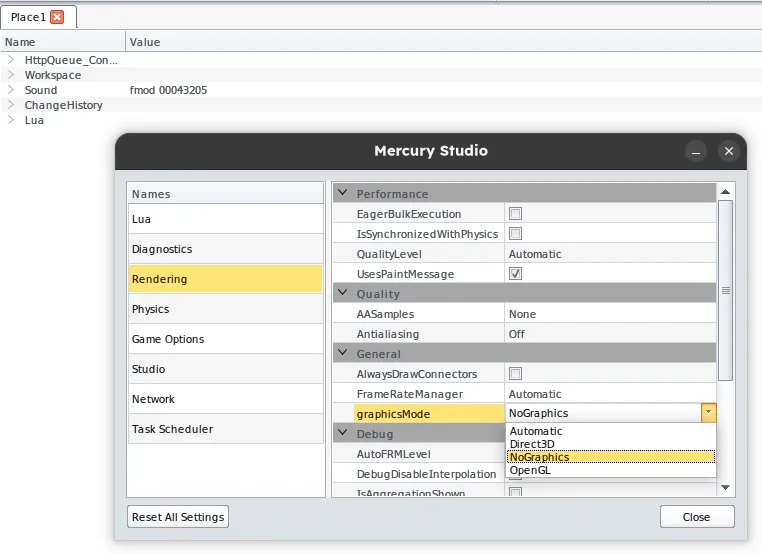
It's possible to disable the Studio 3D view by navigating to File > Settings (or Tools > Settings if using the legacy SystemMenu UI instead of the RibbonBar) > Rendering and setting the 'graphicsMode' option to 'NoGraphics'. This can help reduce resource usage on the host machine, especially when running multiple gameservers, and prevent crashes on systems where hardware-accelerated graphics support is unavailable. This replaces the 3D view with the diagnostics window, and does not affect server functionality. Audio and other UI elements will still function as normal.
Management
Section titled “Management”The Orbiter service needs to know the status of the gameservers it is managing, in order to ensure they are running smoothly, to take action if any issues arise, and to shut them down once they have completed. There are multiple ways this can be achieved:
- Sending HTTP requests from the gameserver to the Orbiter at regular intervals, indicating that the server is still running and healthy, and when the server is starting up and shutting down.
- Checking whether the server process is unresponsive, as the Studio session does not respond while a place file is loading. This system was used in Polygon's Gameserver Arbiter while starting a server.
- Getting the window title of the Studio session, which changes to no longer include the place name once the place has been closed with
DataModel:Shutdown(). This system was also used in Polygon's Gameserver Arbiter, which periodically checked the window title once the server is running. - Creating a loop to use lots of memory or CPU once the server shuts down, and relying on the Orbiter to detect that the memory or CPU usage is too high and terminate the server. In the absence of other methods, this does work, but is possibly the least efficient solution.
- Periodically attempting to start a network server on the same port as the gameserver – once the server fails to start, we know that the gameserver has started successfully. Once the gameserver shuts down, a server can successfully be started on that port again, indicating that the gameserver has stopped.
Since the Mercury Client and Studio currently do not support sending HTTP requests (either with HttpService methods, which are currently disabled, or through methods on the DataModel class, which are not accessible due to permissions issues or are also disabled), systems that send requests directly from the gameserver to the Orbiter cannot be used. APIs that check for server responsiveness and window title also don't work properly on operating systems other than Windows (processes always seem to be responsive, and window titles appear to be empty), so can't be relied on for cross-platform support. Using a memory or CPU loop and detecting usage spikes was found to work reliably, though is extremely inefficient.
It may be possible to check for the network server status by connecting to the Studio session's port from the Orbiter. However, this may provide false positives due to the connection protocol being UDP-based, meaning that the connection may seem to be successful even if no response is received from the server or if the server is not running on that port. Further testing is required to determine whether this method is reliable enough to be used for server management. At the moment, the Orbiter attempts to start a server on the same port as the gameserver to check whether the gameserver is running or not. There are concerns that the server may not be able to start if the Orbiter is attempting to check the gameserver status at the same time as the gameserver is starting up, though in practice this does not seem to be an issue.